|
FORUM AKTUELL
PREISTICKER
- Hardware, Software, ...

- Home-Cinema, HiFi ,...

- Monitore, TFTs, ...

- DVDs, CDs, ...

- Smartphones, Tablets, ...

- Sonderangebote

|
|
|
Download-SucheDiese Suchfunktion durchforstet alle Meldungen, die auf der Startseite zu lesen waren. Die Reviews, der FAQ-Bereich und das Forum werden nicht tangiert.
- Um das Forum zu durchsuchen, bitte hier klicken.
- Um die News zu durchsuchen, bitte hier klicken.
Ergebisse: Seite 1 von 1
Nächste Seite: (1)
Montag, 3. Oktober 2011
19:37 - Autor: Dr@Das kostenlose Bildbearbeitungsprogramm Paint.NET ist in der Version 3.5.9 verfügbar. Das Programm war ursprünglich als Ersatz für das Windows-eigene Paint gedacht, unterstützt heute aber die gängigsten Formate wie BMP, JPG, GIF, TIF, PNG, TGA, DDS und bringt sein eigenes mit (PDN) - weitere werden über Plugins unterstützt, beherrscht die Bearbeitung in Ebenen, bietet viele Effekte und eine unendliche History.Paint.NET läuft unter Windows ab Windows XP SP3, Windows 2003 SP2 bzw. Windows Vista SP1 sowohl unter den 32-bit als auch unter den 64-bit-Versionen. Es wird dabei ein installiertes .NET Framework 3.5 SP1 und ein Prozessor mit SSE-Erweiterung vorausgesetzt, was bei allen CPUs ab dem Intel Pentium III bzw. AMD Athlon XP der Fall ist.
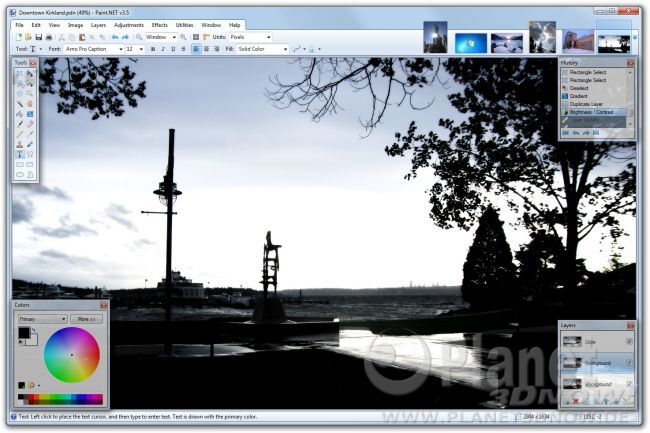 Changelog: - Paint.NET v3.5.9 - Download, released on October 1st, 2011
This update improves the "Auto-Detect" bit-depth feature, and fixes a few small issues.
- Improved: The "Auto-detect" bit-depth setting for PNG, BMP, and TGA now also determines which bit-depth to use based on which one produces the smallest file size, as well as which ones can save the image without losing fidelity.
- Improved: You can now use Ctrl+0 as a shortcut key for View -> Actual Size, in addition to Ctrl+Shift+A and Ctrl+Alt+0.
- Fixed: Some text in the DirectDraw Surface (DDS) Save Configuration UI was not being loaded.
- Fixed: Some DirectDraw Surface (DDS) files authored with other software (e.g. Unreal 2004) could not be loaded.
- Fixed: In some rare circumstances, clicking on the Save button in the toolbar would crash.
- Fixed: The Korean translation has been added back in, with the help of Bing machine translation to cover the few remaining strings that were untranslated.
- Full Version History
Download:
Links zum Thema:
>> Kommentare     
Sonntag, 6. März 2011
15:13 - Autor: Dr@Das kostenlose Bildbearbeitungsprogramm Paint.NET ist in der Version 3.5.8 verfügbar. Das Programm war ursprünglich als Ersatz für das Windows-eigene Paint gedacht, unterstützt heute aber die gängigsten Formate wie BMP, JPG, GIF, TIF, PNG, TGA, DDS und bringt sein eigenes mit (PDN) - weitere werden über Plugins unterstützt, beherrscht die Bearbeitung in Ebenen, bietet viele Effekte und eine unendliche History.Paint.NET läuft unter Windows ab Windows XP SP3, Windows 2003 SP2 bzw. Windows Vista SP1 sowohl unter den 32-bit als auch unter den 64-bit-Versionen. Es wird dabei ein installiertes .NET Framework 3.5 SP1 und ein Prozessor mit SSE-Erweiterung vorausgesetzt, was bei allen CPUs ab dem Intel Pentium III bzw. AMD Athlon XP der Fall ist.
Changelog: - Paint.NET v3.5.8, released on March 5th, 2011
This update fixes some issues with the fault-tolerant save feature introduced in 3.5.7.- Fixed: Saving to a folder that has been moved or renamed will display an error instead of crashing (regression from 3.5.6)
- Fixed: Saving to a Sharepoint site will now work (regression from 3.5.6)
- Fixed: Saving to a file that is marked as read only will now give an error instead of crashing (regression from 3.5.6)
- Fixed: General reliability and correctness improvements to fault-tolerant saving
- Full Version History
Download:
Links zum Thema:
>> Kommentare
Montag, 21. Februar 2011
08:58 - Autor: Dr@Das kostenlose Bildbearbeitungsprogramm Paint.NET ist in der Version 3.5.7 verfügbar. Das Programm war ursprünglich als Ersatz für das Windows-eigene Paint gedacht, unterstützt heute aber die gängigsten Formate wie BMP, JPG, GIF, TIF, PNG, TGA, DDS und bringt sein eigenes mit (PDN) - weitere werden über Plugins unterstützt, beherrscht die Bearbeitung in Ebenen, bietet viele Effekte und eine unendliche History.Paint.NET läuft unter Windows ab Windows XP SP3, Windows 2003 SP2 bzw. Windows Vista SP1 sowohl unter den 32-bit als auch unter den 64-bit-Versionen. Es wird dabei ein installiertes .NET Framework 3.5 SP1 und ein Prozessor mit SSE-Erweiterung vorausgesetzt, was bei allen CPUs ab dem Intel Pentium III bzw. AMD Athlon XP der Fall ist.
Changelog: - Paint.NET v3.5.7, released on February 20th, 2011
This update improves reliability of saving, further improves Copy/Paste functionality, and fixes some other miscellaneous bugs.
- Saving an image is now fault-tolerant. If there is an error or crash while saving, the original file will be left alone.
- Worked around a bug in some plugins that are incorrectly using the built-in Gaussian Blur effect. For example, Sharpen+. Now they won't crash.
- Fixed a bug with Edit->Paste into New Image, where the new image would be 1 pixel too wide or tall, as reported at http://forums.getpaint.net/index.php?/topic/20969-paste-problem/
- Fixed a bug with the Rectangle Select tool and Fixed Ratio selection, which would be off by 1 pixel, as reported at http://forums.getpaint.net/index.php?/topic/20820-croppig-by-fixed-ratio-is-inexact
- When pasting an image from Paint.NET into Paint.NET, it will be a little smarter about where it puts the image. Previously, if the location wasn't within the viewport, it would be placed at the top-left corner of the viewport. Now it will find the nearest point along the edge of the viewport to place the image.
- The EXIF rotation ("orientation") metadata is now discarded when opening an image, which was causing aggravation with images that could then never be reoriented correctly using Image->Rotate
- The EXIF metadata for JPEG thumbnail data are now correctly discarded.
- Fixed a handful of memory leaks.
- Fixed a typo in the Italian translation. In the setup wizard it was referring to "Pain.NET" (woops)
- Full Version History
Download:
Links zum Thema:
>> Kommentare
Donnerstag, 18. November 2010
22:51 - Autor: Dr@Das kostenlose Bildbearbeitungsprogramm Paint.NET ist in der Version 3.5.6 verfügbar. Das Programm war ursprünglich als Ersatz für das Windows-eigene Paint gedacht, unterstützt heute aber die gängigsten Formate wie BMP, JPG, GIF, TIF, PNG, TGA, DDS und bringt sein eigenes mit (PDN) - weitere werden über Plugins unterstützt, beherrscht die Bearbeitung in Ebenen, bietet viele Effekte und eine unendliche History.Paint.NET läuft unter Windows ab Windows XP SP3, Windows 2003 SP2 bzw. Windows Vista SP1 sowohl unter den 32Bit als auch unter den 64Bit Versionen. Es wird dabei ein installiertes .NET Framework 3.5 SP1 und ein Prozessor mit SSE-Erweiterung, welche alle CPUs ab Intel Pentium III bzw. AMD Athlon XP besitzen, vorrausgesetzt.
Changelog: - Paint.NET v3.5.6, released on November 18th, 2010
This update fixes several issues related to copy-paste, improves performance and quality for a few adjustments, and fixes a data loss bug. * When pasting an image, Paint.NET will be smarter about ensuring it is placed within the area that has been scrolled/zoomed to.
* Improved the performance and quality of the Curves and Hue/Saturation adjustments.
* Some minor improvements to memory usage, which should help out a few scenarios on 32-bit systems.
* Fixed: If a JPEG was loaded that had an embedded ICC profile, and was then saved as an 8-bit or 24-bit PNG, then the resulting file would be corrupt (32-bit PNG worked fine though).
* Fixed: 16-bit TGAs no longer load with the red and blue channels swapped.
* Fixed: Copy-paste from a Remote Desktop session will no longer be 'shifted' by 3 pixels.
* Fixed: Copy-paste from Internet Explorer, Firefox, or Chrome should preserve alpha/transparency.
* Fixed: Copying from Paint.NET and pasting into Windows Live Writer should now work.
* Fixed: Taking a full-screen screenshot with Print Screen on a multimonitor system, where those monitors don't form a simple rectangle, will now fill the 'gap area' with transparent instead of black. (Example: two monitors of the same size, one of which is rotated by 90 degrees)
* Fixed: If Paint.NET is opened without specifying an image to open, and then the default image is modified and saved, then Paint.NET will no longer close it upon opening another one. This was causing data loss if that default image had layers, and was then saved in a format that did not support layers (anything other than .PDN).
* Fixed: Some systems were showing 'red X' thumbnails for .PDN files in Windows Explorer, instead of the real thumbnail.
* Fixed: The EXIF "Creation Software" saved along with images is no longer localized. This prevents certain languages from seeing "Paint.NET ????? v3.5.6" in the image properties (metadata).
- Full Version History
Download:
Links zum Thema:
>> Kommentare
Dienstag, 27. April 2010
17:39 - Autor: KIDHDas kostenlose Bildbearbeitungsprogramm Paint.NET ist in der Version 3.5.5 verfügbar. Das Programm war ursprünglich als Ersatz für das Windows-eigene Paint gedacht, unterstützt heute aber die gängigsten Formate wie BMP, JPG, GIF, TIF, PNG, TGA, DDS und bringt sein eigenes mit (PDN) - weitere werden über Plugins unterstützt, beherrscht die Bearbeitung in Ebenen, bietet viele Effekte und eine unendliche History.Paint.NET läuft unter Windows ab Windows XP SP3, Windows 2003 SP2 bzw. Windows Vista SP1 sowohl unter den 32Bit als auch unter den 64Bit Versionen. Es wird dabei ein installiertes .NET Framework 3.5 SP1 und ein Prozessor mit SSE-Erweiterung, welche alle CPUs ab Intel Pentium III bzw. AMD Athlon XP besitzen, vorrausgesetzt.
Changelog:
- Paint.NET v3.5.5 - Download, released on April 25th, 2010
This update fixes a bug when saving 8-bit images, improves layer composition and Gaussian Blur performance, and is now updated to support the new .NET Framework 4.0 in some cases. * Fixed the bug where saving as 8-bit PNG/GIF/BMP wasn't always working, usually with larger images.
* Improved the performance of the Gaussian Blur effect by 30-40%.
* Improved the performance of all the layer blending modes by 15-30%.
* Improved the performance of zooming with the mouse wheel on dual-core Intel Atom systems.
* Updated to support .NET 4.0 if no other version of .NET is installed.
* Reduced download size from 4.8MB down to 3.5MB.
* Fixed a small error in the Chinese translation. - Please note that the system requirements have been updated. For Windows XP, you must now have Service Pack 3 (SP3) installed; SP2 is no longer supported. For Windows Vista, you must now have Service Pack 1 installed.
- Full Version History
Download:
Links zum Thema:
» Kommentare
|
|
|
Nach oben
|
|






Diesen Artikel bookmarken oder senden an ...